Introduction
A professional roll-up banner starts with a correctly prepared artwork file.
Even the best printing equipment cannot produce perfect results from a file that contains technical problems.
Incorrect dimensions, low-quality images, missing bleed areas or important text placed too close to the edges can affect the final result.
Preparing your roll-up banner file correctly before ordering helps you:
- improve print quality
- avoid production delays
- reduce correction requests
- receive your banner faster
Whether you need a roll-up banner for a conference, exhibition, business presentation or marketing event, following the right artwork guidelines is an important step.
This guide explains how to prepare a professional print-ready roll-up banner file before sending it to production.
Why File Preparation Matters Before Printing
Large format printing is different from standard office printing.
A roll-up banner is designed to be viewed from a distance and needs to look professional in a business environment.
Small problems on your computer screen can become much more visible when printed in a large size.
Common file issues include:
- blurry images
- incorrect proportions
- missing margins
- colours that appear differently after printing
- important information placed too close to the edges
Correct file preparation allows the printing process to start faster and helps achieve better results.
For urgent orders, such as same day printing, a production-ready file is even more important.
Correct Roll-Up Banner Size
Before designing your artwork, always check the final size of your roll-up banner.
Different banner systems can have different dimensions.
Common roll-up banner sizes include:
- 85 × 200 cm
- 100 × 200 cm
- 120 × 200 cm
Your design file should match the final production size requested.
Changing dimensions after the design is finished can sometimes create layout problems.
Images, text and graphic elements may need to be repositioned.
Starting with the correct size saves time and helps avoid mistakes.
Understanding Bleed and Safety Margins
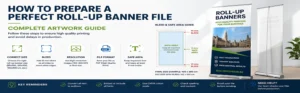
Bleed and safety margins are two of the most important elements when preparing a print file.
They help ensure that your design looks professional after production and finishing.
What is bleed?
Bleed is an extra area added around your design.
It extends your background beyond the final visible size.
This prevents unwanted white borders after cutting or finishing.
For roll-up banner printing, always follow the bleed requirements provided by your printer.
What is a safety margin?
The safety margin is the area where important information should remain inside the design.
Keep elements such as:
- logos
- text
- QR codes
- contact information
away from the edges.
This prevents important content from being too close to the final border.
Choosing the Right Resolution for Large Format Printing
Image quality plays an important role in professional banner printing.
Images downloaded from websites are often too small for large format production.
A picture that looks good on a phone or computer screen may become pixelated when enlarged.
For the best result:
- use high-quality images
- avoid screenshots
- avoid compressed images from messaging apps
- use original design files when possible
A clean and sharp artwork file creates a more professional final banner.
Choosing the Best File Format for Roll-Up Banner Printing
The file format you send can directly influence production quality.
For professional printing, the recommended format is usually a high-quality PDF file.
PDF files help preserve important design elements such as:
- images
- fonts
- colours
- layout
- proportions
Unlike editable design files, a properly exported PDF reduces the risk of unexpected changes when the file is opened on another computer.
Before sending your file, always check the final PDF version and make sure everything appears correctly.
CMYK vs RGB Colours: What You Should Know
Colours can look different between a screen and a printed product.
Most screens display colours using RGB mode because they create colours with light.
Professional printing uses CMYK colours created with printing inks.
Because these two systems work differently, some bright colours visible on a screen cannot be reproduced exactly in print.
For better results:
- prepare your artwork using professional design software
- choose print-friendly colours
- avoid judging colours only from your screen
- check important brand colours before production
Understanding this difference helps avoid surprises when receiving your final roll-up banner.
Preparing Fonts and Text Correctly
Text problems are among the most common issues in print files.
A missing font can change the appearance of your design.
Before exporting your file, make sure that:
- fonts are embedded in the PDF
- text is converted to outlines when needed
- small text remains readable
- important information is not too close to the edges
For roll-up banners, readability is essential.
Your message should be clear from a normal viewing distance.
QR Codes and Contact Information
Many modern roll-up banners include QR codes.
They are useful for:
- websites
- product pages
- contact forms
- event registration pages
- digital brochures
Before printing:
- scan your QR code
- check that the link works
- make sure the QR code size is large enough
- leave enough empty space around it
A QR code that cannot be scanned after printing loses its purpose.
Common Roll-Up Banner Artwork Mistakes to Avoid
Before ordering your banner, check for these common problems.
Using Low Resolution Images
Images copied from websites or social media are usually not suitable for professional printing.
Always use original high-quality images.
Placing Text Too Close to the Edge
Important information near the border may look uncomfortable or be affected by finishing.
Keep enough space around your content.
Sending Screenshots Instead of Artwork Files
Screenshots are not professional print files.
They often have:
- low resolution
- compression problems
- incorrect dimensions
Always export your final design properly.
Forgetting to Check Spelling
Printing is a physical product.
Once production starts, correcting mistakes is much more complicated.
Always review:
- names
- phone numbers
- website addresses
- dates
- event information
before sending your file.
Roll-Up Banner File Checklist Before Ordering
Before uploading your artwork, verify:
✅ Correct banner size
✅ High-quality images
✅ Bleed added if required
✅ Important elements inside safe area
✅ Text checked
✅ QR codes tested
✅ Final PDF exported correctly
A few minutes of checking can prevent delays and improve the final result.
Preparing Your File for Same Day Roll-Up Banner Printing
When you need urgent production, file preparation becomes even more important.
Same day printing requires a smooth production process because available time is limited.
A print-ready file allows production to start faster and reduces unnecessary delays.
Before placing an urgent order, make sure:
- your artwork is finished
- your file size is correct
- your PDF is ready for production
- all information has been checked
- your images are high quality
The earlier your file is ready, the easier it is to complete production within a short deadline.
For urgent projects, preparation is the key to a successful result.
Professional File Checking Before Production
Even experienced designers can sometimes miss small technical details.
A professional file check helps identify possible issues before printing.
Common elements checked before production include:
- document dimensions
- image quality
- margins
- file compatibility
- general print readiness
This verification step helps ensure that your roll-up banner is produced correctly.
Professional preparation reduces risks and improves the final result.
Preparing Roll-Up Banners for Events and Exhibitions
Roll-up banners are widely used for professional events because they are practical and effective.
They are commonly prepared for:
- exhibitions
- conferences
- business presentations
- product launches
- corporate meetings
- trade shows
For important events, always allow enough time to prepare your artwork.
A professional file combined with high-quality printing helps your company create a strong visual presence.
Why Choose RollUpExpress for Roll-Up Banner Printing
RollUpExpress helps businesses create professional roll-up banners with a simple online ordering process.
Our goal is to make professional printing easier for:
- companies
- exhibitors
- event organisers
- marketing agencies
- international visitors
We provide roll-up banner solutions adapted to different needs:
- standard production
- express production
- same day printing options
Our Brussels-based production allows us to support professionals preparing for conferences, exhibitions and business events.
More Helpful Printing Guides
Preparing a professional event?
You may also find these guides useful:
Read our complete guide about same day printing in Brussels.
Learn more about roll-up banner printing near Square Brussels Meeting Centre.
Discover our guide for Brussels Expo exhibitors.
(ici on ajoutera les liens vers Articles #1 #2 #3)
Final Thoughts: A Better File Creates a Better Banner
A successful roll-up banner starts before printing begins.
Correct artwork preparation helps achieve:
- better print quality
- faster production
- fewer corrections
- a more professional final result
Taking the time to prepare your file correctly is one of the easiest ways to improve your printed materials.
With the right artwork and reliable production, your roll-up banner will be ready to represent your business professionally.
Roll-Up Banner File Preparation FAQ
What is the best file format for roll-up banner printing?
The recommended file format for professional roll-up banner printing is a high-quality PDF file.
A PDF helps preserve your images, fonts, layout and design elements during the production process.
What size should my roll-up banner artwork be?
Your artwork should be created at the final size of your roll-up banner.
Common roll-up banner sizes include 85 × 200 cm, 100 × 200 cm and 120 × 200 cm.
Always check the exact product specifications before preparing your design.
Do I need bleed for a roll-up banner file?
Yes. Adding the correct bleed area helps prevent unwanted borders and ensures a professional result after production.
Always follow the technical specifications provided by your printing company.
Why do images become blurry when printed on a roll-up banner?
Images may become blurry if their resolution is too low for large format printing.
For professional results, use high-quality original images instead of screenshots or compressed images from websites and social media.
Can a correctly prepared file make same day printing faster?
Yes. A print-ready file allows production to start faster because fewer corrections are required.
This is especially important for urgent orders and same day roll-up banner printing.
From Our Print Shop
For the best print result, use high-resolution files with proper bleed and clear brand instructions. Replace this text in each article with a practical expert recommendation from Rollup Express.
Need urgent printing in Brussels Today?
Upload your print-ready files before 11:00 AM and get your roll-up banners and event materials produced the same day in Brussels.